Open an interactive version of this example on Binder:

Target Tracking#
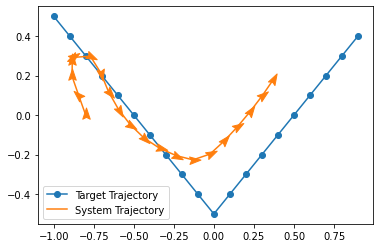
This example demonstrates the kernel-based stochastic optimal control algorithm and the dynamic programming algorithm. By default, it uses a nonholonomic vehicle system (unicycle dynamics), and seeks to track a v-shaped trajectory.
To run the example, use the following command:
python examples/control/tracking.py
[1]:
import gym

import numpy as np

from gym.envs.registration import make

from gym_socks.algorithms.control.kernel_control_fwd import KernelControlFwd
from gym_socks.algorithms.control.kernel_control_bwd import KernelControlBwd

from functools import partial

from gym_socks.kernel.metrics import rbf_kernel

from gym_socks.sampling import space_sampler
from gym_socks.sampling import transition_sampler

from gym_socks.utils.grid import cartesian
/home/docs/checkouts/readthedocs.org/user_builds/socks/envs/develop/lib/python3.9/site-packages/tqdm/auto.py:22: TqdmWarning: IProgress not found. Please update jupyter and ipywidgets. See https://ipywidgets.readthedocs.io/en/stable/user_install.html
  from .autonotebook import tqdm as notebook_tqdm
Configuration variables.
[2]:
system_id = "NonholonomicVehicleEnv-v0"

sigma = 3  # Kernel bandwidth parameter.
regularization_param = 1e-7  # Regularization parameter.

time_horizon = 20

# For controlling randomness.
seed = 12345
Generate the Sample#
We generate a random sample from the system, and choose random control actions and random initial conditions.
[3]:
env = make(system_id)
env.sampling_time = 0.1
env.seed(seed)
sample_size = 1500

state_sample_space = gym.spaces.Box(
    low=np.array([-1.2, -1.2, -2 * np.pi], dtype=np.float32),
    high=np.array([1.2, 1.2, 2 * np.pi], dtype=np.float32),
    shape=(3,),
    dtype=np.float32,
    seed=seed,
)

action_sample_space = gym.spaces.Box(
    low=np.array([0.1, -10.1], dtype=np.float32),
    high=np.array([1.1, 10.1], dtype=np.float32),
    shape=(2,),
    dtype=np.float32,
    seed=seed,
)

state_sampler = space_sampler(state_sample_space)
action_sampler = space_sampler(action_sample_space)
S = transition_sampler(env, state_sampler, action_sampler).sample(size=sample_size)

A = cartesian(np.linspace(0.1, 1.1, 10), np.linspace(-10.1, 10.1, 21))
/home/docs/checkouts/readthedocs.org/user_builds/socks/envs/develop/lib/python3.9/site-packages/gym/utils/env_checker.py:144: UserWarning: WARN: Agent's minimum observation space value is -infinity. This is probably too low.
  logger.warn(
/home/docs/checkouts/readthedocs.org/user_builds/socks/envs/develop/lib/python3.9/site-packages/gym/utils/env_checker.py:148: UserWarning: WARN: Agent's maxmimum observation space value is infinity. This is probably too high
  logger.warn(
/home/docs/checkouts/readthedocs.org/user_builds/socks/envs/develop/lib/python3.9/site-packages/gym/utils/env_checker.py:172: UserWarning: WARN: Agent's minimum action space value is -infinity. This is probably too low.
  logger.warn(
/home/docs/checkouts/readthedocs.org/user_builds/socks/envs/develop/lib/python3.9/site-packages/gym/utils/env_checker.py:176: UserWarning: WARN: Agent's maximum action space value is infinity. This is probably too high
  logger.warn(
/home/docs/checkouts/readthedocs.org/user_builds/socks/envs/develop/lib/python3.9/site-packages/gym/utils/env_checker.py:200: UserWarning: WARN: We recommend you to use a symmetric and normalized Box action space (range=[-1, 1]) cf https://stable-baselines3.readthedocs.io/en/master/guide/rl_tips.html
  logger.warn(
/home/docs/checkouts/readthedocs.org/user_builds/socks/envs/develop/lib/python3.9/site-packages/gym/envs/registration.py:619: UserWarning: WARN: Env check failed with the following message: The environment cannot be reset with a random seed. This behavior will be deprecated in the future.
You can set `disable_env_checker=True` to disable this check.
  logger.warn(
We define the cost as the norm distance to the target at each time step.
[4]:
a = 0.5  # Path amplitude.
p = 2.0  # Path period.
target_trajectory = [
    [
        (x * 0.1) - 1.0,
        4 * a / p * np.abs((((((x * 0.1) - 1.0) - p / 2) % p) + p) % p - p / 2) - a,
    ]
    for x in range(time_horizon)
]


def _tracking_cost(time: int = 0, state: np.ndarray = None) -> float:
    """Tracking cost function.

    The goal is to minimize the distance of the x/y position of the vehicle to the
    'state' of the target trajectory at each time step.

    Args:
        time : Time of the simulation. Used for time-dependent cost functions.
        state : State of the system.

    Returns:
        cost : Real-valued cost.

    """

    dist = state[:, :2] - np.array([target_trajectory[time]])
    result = np.linalg.norm(dist, ord=2, axis=1)
    result = np.power(result, 2)
    return result
Algorithm#
Now, we can compute the policy using the algorithm, and then simulate the system forward in time using the computed policy.
In order to change this to the dynamic programming algorithm, use KernelControlBwd.
[5]:
# Compute the policy.
policy = KernelControlFwd(
    time_horizon=time_horizon,
    cost_fn=_tracking_cost,
    kernel_fn=partial(rbf_kernel, sigma=sigma),
    regularization_param=regularization_param,
    verbose=False,
)

policy.train(S=S, A=A)

# Simulate the controlled system.
env.reset()
initial_condition = [-0.8, 0, 0]
env.reset(initial_condition)
trajectory = [initial_condition]

for t in range(time_horizon):
    action = policy(time=t, state=env.state)
    state, *_ = env.step(time=t, action=action)

    trajectory.append(list(state))
Results#
We then plot the simulated trajectories of the actual system alongside the predicted state trajectory using the approximated dynamics.
[6]:
import matplotlib
import matplotlib.pyplot as plt

fig = plt.figure()
ax = plt.axes()

target_trajectory = np.array(target_trajectory, dtype=np.float32)
plt.plot(
    target_trajectory[:, 0],
    target_trajectory[:, 1],
    marker="o",
    color="C0",
    label="Target Trajectory",
)

trajectory = np.array(trajectory, dtype=np.float32)
plt.plot(
    trajectory[:, 0],
    trajectory[:, 1],
    color="C1",
    label="System Trajectory",
)

# Plot the markers as arrows, showing vehicle heading.
paper_airplane = [(0, -0.25), (0.5, -0.5), (0, 1), (-0.5, -0.5), (0, -0.25)]

for x in trajectory:
    angle = -np.rad2deg(x[2])

    t = matplotlib.markers.MarkerStyle(marker=paper_airplane)
    t._transform = t.get_transform().rotate_deg(angle)

    plt.plot(x[0], x[1], marker=t, markersize=15, linestyle="None", color="C1")

plt.legend()
plt.show()